Explore the complete list of Android 16 Supported Devices and find out if your phone will get the latest update. Check release dates, new features, and download options.
The first question that comes to mind when a new Android version shows up is simple.
Will my phone get it or not?
I still remember checking my phone settings again and again during the last big Android update, hoping the update button would magically appear. If you’re doing the same right now, you’re not alone. That’s exactly why this guide exists.
In this post, I’m breaking down Android 16 supported devices in a clear, friendly way. No confusing terms. No guessing games. Just real answers, explained like I’d explain them to a friend sitting next to me.
If you want to explore the official technical details, you can check out Google’s documentation here: Android 16 Official Documentation
Table of Contents
What Does “Android 16 Supported Devices” Really Mean?
When people search for Android 16 supported devices, they usually want one thing.
They want to know if their phone will receive the Android 16 update officially.
A supported device means:
- The phone can install Android 16 without hacks
- The update comes directly from the brand
- Security updates continue after installation
If a phone doesn’t make the list, it doesn’t mean the phone becomes useless. It just means it won’t get the latest Android 16 features officially.
How Brands Decide Android 16 Eligibility
Here’s something many people don’t realize.
Android updates don’t depend only on Google. Phone brands play a big role. Each brand follows its own update promise, based on:
- Phone age
- Processor
- Price segment
- Update policy
For example, flagship phones usually get updates longer. Budget phones often stop earlier. I’ve seen expensive phones from years ago still get updates, while cheaper ones don’t.
That’s just how the Android world works.
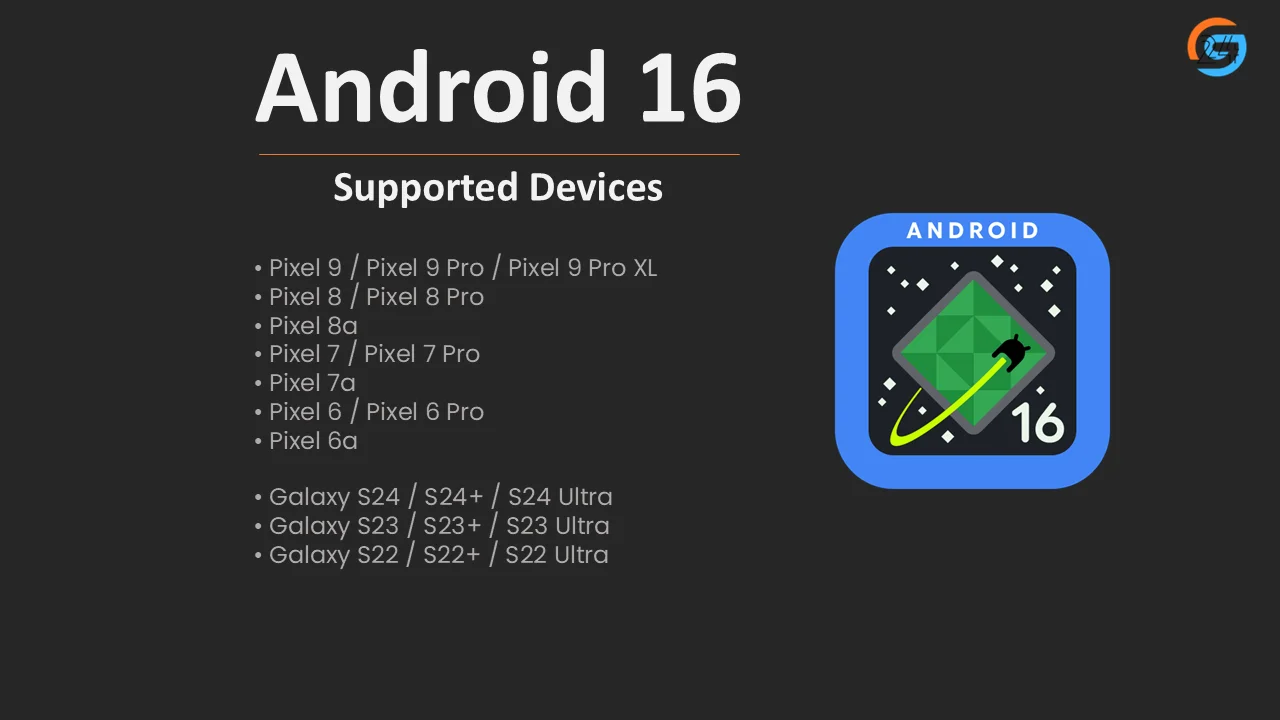
Android 16 Pixel Update: Supported Google Pixel Phones
Google Pixel phones always get Android updates first. If you use a Pixel, you’re already in a good place.
✅ Expected Google Pixel Devices Supporting Android 16
- Pixel 9 / Pixel 9 Pro / Pixel 9 Pro XL
- Pixel 8 / Pixel 8 Pro
- Pixel 8a
- Pixel 7 / Pixel 7 Pro
- Pixel 7a
- Pixel 6 / Pixel 6 Pro
- Pixel 6a
If you own a Pixel, Android updates usually feel smooth and clean. I’ve always noticed Pixel phones get new Android versions faster and with fewer bugs.
Samsung Phones Expected to Get Android 16
Samsung has improved a lot with updates. Older Samsung phones used to struggle with updates. That’s not the case anymore.
✅ Likely Samsung Galaxy Android 16 Supported Devices
Galaxy S Series
- Galaxy S24 / S24+ / S24 Ultra
- Galaxy S23 / S23+ / S23 Ultra
- Galaxy S22 / S22+ / S22 Ultra
Galaxy Z Series
- Galaxy Z Fold 6 / Flip 6
- Galaxy Z Fold 5 / Flip 5
- Galaxy Z Fold 4 / Flip 4
Galaxy A Series
- Galaxy A55
- Galaxy A54
- Galaxy A35
- Galaxy A34
Samsung users usually wait a bit longer, but One UI updates bring many extras on top of Android 16. That wait often feels worth it.
OnePlus Phones Eligible for Android 16
OnePlus still focuses on performance and clean software. Android updates remain an important part of its identity.
✅ Expected OnePlus Android 16 Supported Devices
- OnePlus 12
- OnePlus 12R
- OnePlus 11
- OnePlus Open
- OnePlus Nord 3
- OnePlus Nord CE 3
If you like speed and minimal design, Android 16 on OnePlus should feel smooth and fast.
Xiaomi Phones That May Receive Android 16
Xiaomi updates depend heavily on region and model. That’s something I’ve noticed again and again.
✅ Likely Xiaomi Android 16 Supported Devices
- Xiaomi 14 / 14 Pro
- Xiaomi 13 / 13 Pro
- Redmi Note 13 Pro+
- Redmi Note 13 Pro
- Xiaomi 13T / 13T Pro
Xiaomi often mixes Android updates with MIUI or HyperOS changes. So Android 16 features may arrive with a different look.
Realme Phones Expected to Get Android 16
Realme focuses on young users and fast updates for newer models.
✅ Expected Realme Android 16 Supported Devices
- Realme GT 6
- Realme GT 5 Pro
- Realme 12 Pro+
- Realme 11 Pro+
Realme updates often arrive quietly, without much announcement. Checking settings regularly helps.
Vivo and iQOO Android 16 Supported Devices
Vivo and iQOO share software foundations, so updates usually follow similar paths.
✅ Likely Vivo & iQOO Devices
- Vivo X100 / X100 Pro
- Vivo X90 / X90 Pro
- iQOO 12
- iQOO 11
Android 16 on these phones may focus more on stability and battery life rather than flashy changes.
Motorola Phones That May Get Android 16
Motorola surprises people sometimes. Some phones get updates quickly, others don’t.
✅ Expected Motorola Android 16 Supported Devices
- Motorola Edge 50 Pro
- Motorola Edge 40 Pro
- Moto G Power (newer models)
Motorola’s clean Android feel pairs nicely with new Android versions when updates arrive on time.
Android 16 Beta: Who Can Try It Early?
If waiting feels hard, the Android 16 beta offers early access. This version is for testing, not daily use.
Phones That Usually Support Beta:
- Google Pixel devices (mainly)
- Select flagship phones later
I’ve tried beta versions before. They feel exciting, but bugs pop up. Apps crash. Battery drains faster. I never recommend beta software on a main phone.
How to Check If Your Phone Will Get Android 16
Here’s a simple trick I use every year:
- Check your phone’s launch year
- Look at the brand’s update promise
- Compare with previous Android updates
If your phone received Android 14 and Android 15, chances for Android 16 look good.
Android 16 Release Date: When Will Updates Roll Out?
Google usually releases new Android versions around the same time each year.
📅 Expected Timeline
- Android 16 beta: Early 2025
- Stable Android 16 release date: Late 2025
- Brand rollouts: Late 2025 to early 2026
Pixel phones go first. Other brands follow slowly.
What New Android 16 Features Mean for Supported Devices
Even if a phone supports Android 16, feature availability can differ.
Some phones get:
- Better battery management
- Smoother animations
- Improved privacy controls
Others miss advanced features due to hardware limits.
I’ve seen two phones with the same Android version behave very differently. That’s normal in the Android world.
Android 16 Download: How the Update Arrives
The Android 16 download usually appears as:
- OTA (Over-the-Air) update
- Notification in settings
No need to connect to a computer. Just Wi-Fi, enough battery, and patience.
What If Your Phone Is Not on the Android 16 Supported Devices List?
This part always feels disappointing.
If your phone doesn’t get Android 16:
- It will still work fine
- Apps will continue to update
- Security updates may continue for some time
I’ve used phones stuck on older Android versions for years without issues. Missing features doesn’t mean missing functionality.
Final Thoughts: Should You Worry About Android 16 Support?
Here’s my honest take.
Android updates matter, but they aren’t everything. A smooth phone with Android 15 can feel better than a buggy Android 16 update.
Still, knowing the Android 16 supported devices list helps you plan better. Whether you’re waiting for the update or thinking about a future phone, information gives peace of mind.
If your phone is on the list, great. If it’s not, enjoy what you have. Technology should make life easier, not stressful.
I’ll keep this list updated as brands confirm more devices. Bookmark this page and check back later.