OriginOS 6 new features explained in simple words. Learn what’s new, what’s better, and whether this update is worth installing on vivo and iQOO phones.
Table of Contents
1. Introduction
Every year, phone companies promise “big changes,” but many updates feel small in daily use. That’s why OriginOS 6 new features feel different. This update is not just about new icons or fancy names—it focuses on how people actually use their phones every single day.
OriginOS 6 new features bring smoother performance, smarter AI tools, better privacy controls, and a cleaner design across vivo and iQOO devices. Whether someone uses a phone for gaming, photos, schoolwork, office tasks, or simple scrolling, these features make everyday use easier and faster.
What makes this update stand out is balance. The OriginOS 6 new features don’t overload the phone with unnecessary extras. Instead, they improve what truly matters: speed, battery life, privacy, and comfort. I noticed that vivo is clearly listening to user feedback this time, making the update feel practical and user-friendly. With OriginOS 6 new features, users finally get a combination of efficiency, intelligence, and smooth design in one update.
This guide is for anyone curious about OriginOS 6 new features. It helps current vivo and iQOO users, people planning to buy a new phone, and even parents choosing a phone for their kids. I explain everything in simple language, with real-life examples, so it’s easy to understand even if English is not your first language.
If you ever asked, “Is this update really worth installing?” or “What actually changed?”, this article answers those questions clearly and honestly.
Read the complete OriginOS 6 guide to explore all new features, supported devices, and update instructions: originos-6-complete-guide
2. What Is OriginOS 6?
OriginOS first arrived as vivo’s bold step away from heavy, boring Android skins. The goal was simple: make phones feel fresh, fast, and personal. Over time, OriginOS became more polished with each version.
OriginOS 5 focused on stability and basic performance. It worked well, but some parts still felt heavy. Animations were nice, but not always smooth on mid-range phones. Multitasking existed, but it was not perfect.
Now comes OriginOS 6, built on a newer Android base (expected to be Android 15 or newer, depending on region). This version feels more mature. It doesn’t try to show off too much. Instead, it quietly improves things in the background.
The biggest difference between OriginOS 5 and OriginOS 6 is intelligence. The system now understands usage habits better. It learns when someone games, works, or rests. Vivo’s vision is clear: the phone should adjust to the user, not the other way around.
In simple words, OriginOS 6 aims to feel lighter, smarter, and more human.
3. OriginOS 6 Release Date & Rollout Plan
The OriginOS 6 release date rollout follows vivo’s usual pattern. Flagship devices get the update first, followed by mid-range phones. Beta testing starts early to catch bugs, while the stable update rolls out slowly to avoid major issues.
China usually receives OriginOS updates first. After that, global regions follow, depending on device and model. Some regions may still use Funtouch OS branding, but many features remain the same.
Older devices will get the update in phases. Vivo prefers stability over speed, which means waiting a bit longer can actually be a good thing.
If someone wants exact dates, checking the official update page or the phone’s system update section works best.
4. Supported Devices for OriginOS 6
Not every phone will get this update, and that’s normal. OriginOS 6 supported devices mainly include:
- Vivo flagship phones (X and iQOO series)
- Recent iQOO performance models
- Selected mid-range devices launched in the last 2–3 years
Older and budget models may not receive the update due to hardware limits. Heavy AI features and animations need stronger processors and more RAM.
To check eligibility:
- Open Settings
- Go to System Update
- Check update information
If OriginOS 6 appears, the device is supported.
You can find OriginOS 6 Supported Devices
5. OriginOS 6 New Features – Complete Breakdown
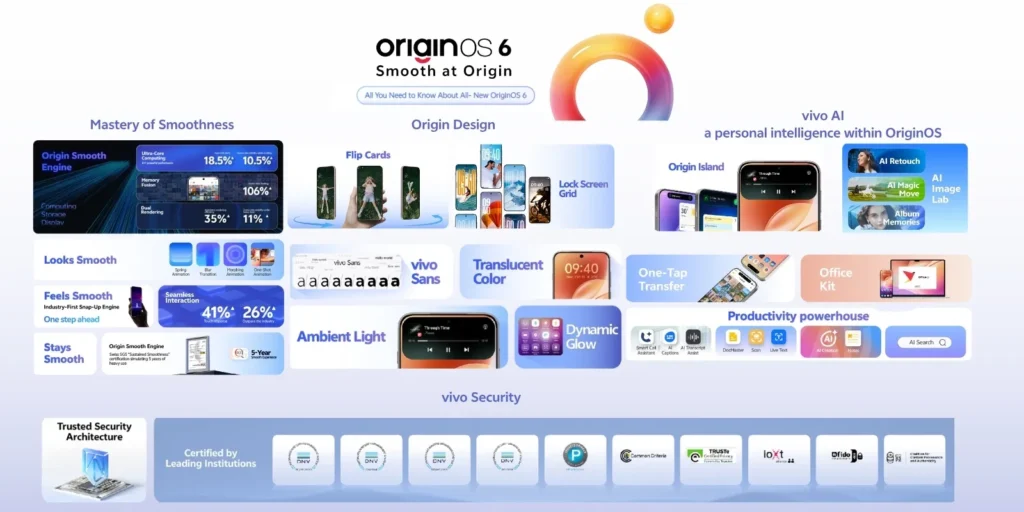
1. Redesigned User Interface (UI Enhancements)
One of the most noticeable improvements in OriginOS 6 new features is the cleaner, more intuitive interface. The home screen now feels less crowded, icons look sharper but simpler, and animations flow smoothly, creating a natural, effortless experience rather than flashy effects.
Lock screen customization, another key part of the OriginOS 6 new features, now offers more freedom. You can change clock styles, add shortcuts, and set wallpapers that feel truly personal. It reminds me of setting up a new phone, but without any stress.
Overall, the redesigned UI is a core highlight of OriginOS 6 new features, making everyday interactions smoother and more enjoyable.
2. Smarter Performance & System Optimization
Apps now open faster, and switching between them feels much smoother—one of the standout aspects of OriginOS 6 new features. This improvement matters most when using social apps, the camera, or maps simultaneously.
RAM management has also improved with OriginOS 6 new features, allowing the phone to remember frequently used apps and keep them ready for instant access. Gaming performance benefits as well, feeling more stable during long sessions, making everyday phone use faster and more enjoyable.
Overall, these performance upgrades highlight why OriginOS 6 new features focus on real-world usability rather than just flashy improvements.
3. AI-Powered Features in OriginOS 6
AI works quietly in the background, which is one of the most useful OriginOS 6 new features. The system now suggests apps based on time and usage, making daily tasks smoother and faster.
Photos benefit from smarter image processing, another highlight of OriginOS 6 new features, producing clearer and more natural results. Voice commands also feel quicker and more accurate, helping users get things done effortlessly.
Nothing feels forced or overwhelming. That’s what makes OriginOS 6 new features stand out—they improve everyday phone use without any hassle.
4. Enhanced Privacy & Security Features
Privacy gets serious attention. Camera and microphone alerts appear instantly. Permission controls feel clearer and easier to understand.
The privacy dashboard shows which apps accessed data recently. This helps parents and regular users feel safer.
5. Battery & Power Efficiency Improvements
Battery life improves through adaptive usage learning. The phone understands sleep patterns and charging habits. Smart charging reduces battery wear over time.
Less background drain means fewer charging worries during the day.
6. New Multitasking & Productivity Tools
Split-screen works smoother. Floating windows resize easily. One-handed mode helps when using large phones.
These tools help students, workers, and even kids doing homework on phones.
7. Camera & Multimedia Enhancements
The camera app feels faster. AI improves photos without making them look fake. Video stability improves, especially for handheld shooting.
Gallery management feels smoother and more organized.
8. Gaming-Focused Features
Game Mode improves touch response and network stability. Heat control works better, reducing frame drops.
For gamers, this update feels practical, not just marketing.
6. OriginOS 6 vs OriginOS 5: What’s Changed?
OriginOS 6 looks cleaner and runs smoother. Animations feel lighter. Battery lasts longer. AI feels smarter.
No major features feel removed. Instead, existing tools feel improved. The upgrade feels worth it, especially for daily users.
For official details and updates, check the OriginOS 6 official page.
7. How to Update to OriginOS 6
Updating is simple:
- Open Settings
- Go to System Update
- Download and install
Before updating:
- Back up important data
- Charge battery above 50%
- Use stable Wi-Fi
Manual updates are available for advanced users, but OTA works best for most people.
8. Common Issues & Known Bugs
Early users reported minor heating and battery calibration issues. Some apps may need updates for full compatibility.
Restarting the phone or clearing cache usually fixes small bugs.
9. Should You Upgrade to OriginOS 6?
Upgrade immediately if:
- You like new features
- You care about performance and battery
Wait if:
- You rely on very old apps
- Your phone struggles with storage
Overall, benefits outweigh risks.
10. Final Verdict: Is OriginOS 6 the Best Vivo UI Yet?
Yes. OriginOS 6 feels thoughtful. It improves real-life usage instead of showing off. The best part is how natural everything feels.
If this is the direction vivo continues, future updates will only get better. For now, OriginOS 6 stands as the most balanced and user-friendly version yet.
You can also read my related blogs below:
- originos-6-complete-guide
- OriginOS 6 Supported Devices
- How to update to OriginOS 6.
- OriginOS 6 Release Date
FAQs About OriginOS 6 New Features
1. What’s new in Origin OS 6?
OriginOS 6 introduces a cleaner design, smoother animations, and faster performance. It adds smarter AI features, better battery optimization, stronger privacy controls, improved multitasking, and more stable gaming and camera performance, making everyday phone use simpler, safer, and more efficient.
2. What are the AI features of OriginOS 6?
OriginOS 6’s AI features include smart app suggestions based on usage patterns, improved voice assistant responses, AI-enhanced photo processing for clearer images, and intelligent system recommendations. These features help the phone adapt to user habits, making daily tasks faster and more personalized without being intrusive.
3. What are the features of Origin OS?
OriginOS offers a clean, customizable interface, smooth animations, smart app suggestions, enhanced privacy controls, efficient battery management, and improved performance. It also includes flexible multitasking tools, AI-powered photo and voice features, and strong gaming and camera optimizations, making daily smartphone use faster, more intuitive, and user-friendly.
4. Is OriginOS better than Funtouch OS?
Most users find OriginOS better than Funtouch OS because it feels cleaner, smoother, and more intuitive. OriginOS focuses on smarter AI tools, stronger privacy controls, better performance, and improved battery life. Funtouch OS works fine, but OriginOS generally feels more modern and user-friendly for everyday use.
5. Will iQOO Neo 7 Pro get Origin OS 6?
Yes — the iQOO Neo 7 Pro will receive the OriginOS 6 update. iQOO has officially confirmed that both the Neo 7 and Neo 7 Pro are included in the OriginOS 6 rollout, with the update expected to arrive in the first half of 2026. It brings Android 16-based features, smoother performance, and a refreshed experience to these phones.
6. What is new in OriginOS 6?
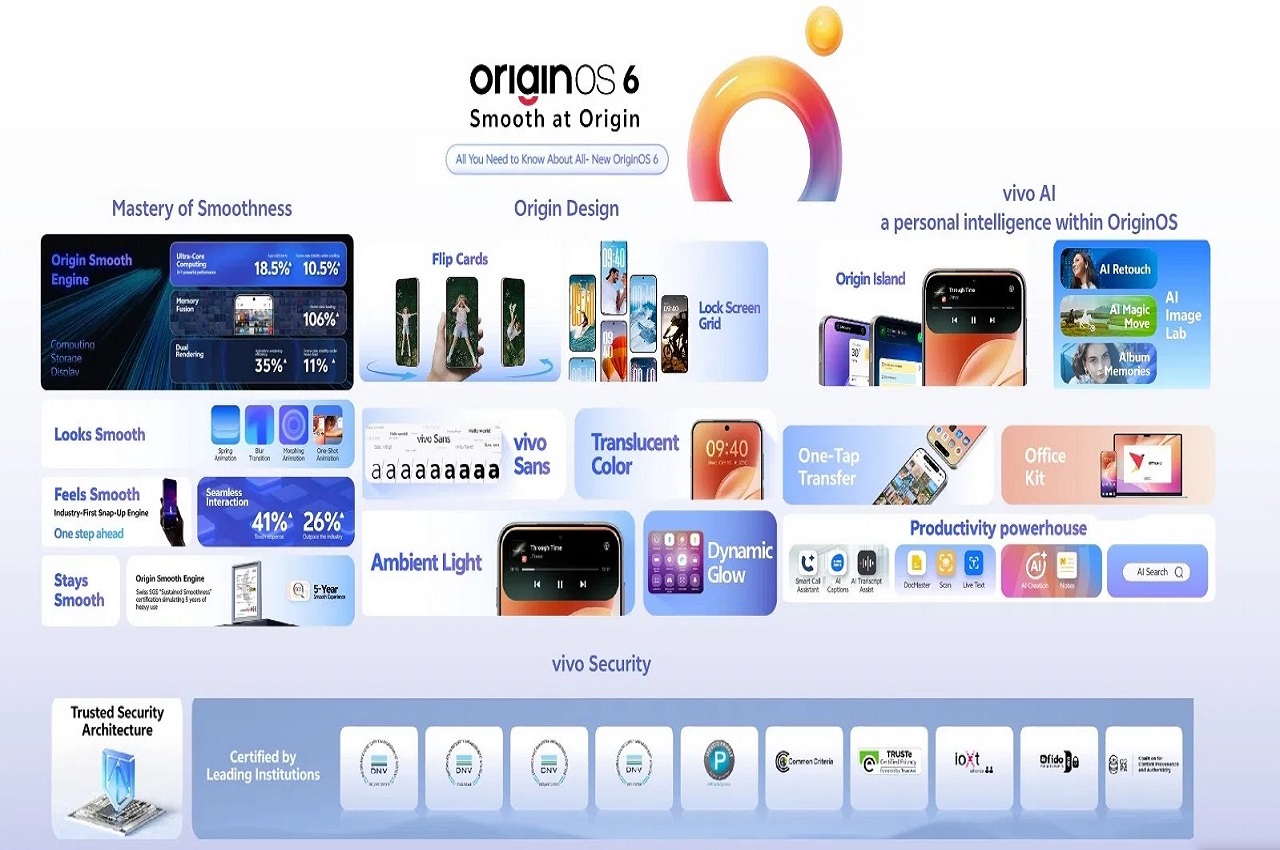
OriginOS 6 brings a fresh, smoother interface with translucent visuals and customizable lock screen widgets, faster performance thanks to the Origin Smooth Engine, and deeper AI tools like smart photo editing and Origin Island. It also improves animations, responsiveness, and overall usability, making everyday phone use feel faster and more intuitive.