Samsung has launched Samsung One UI 8.5 Beta in India with new AI features, improved security, and seamless connectivity. Check supported devices, key upgrades, and how to download the update.
Hello friends, welcome to gadgets24.tech. Today’s Blogs is going to be very good and interesting for you because Samsung has recently launched Samsung One UI 8.5 Beta So there are some top changes in it which are very important for you to know. I will talk about that in this blog. So first of all, you can check in your Samsung device that Samsung One UI 8.5 So guys in the software update, you can see that the update of One UI 8.5 has arrived. Many things have changed here. I will tell you one by one here. Talking about the update, friends, this is an update of around 4 GB. If you have this device or any device of S25 series, then you can install this update now.
Table of Contents
Samsung One UI 8.5 All New Features, UI Changes & Improvements
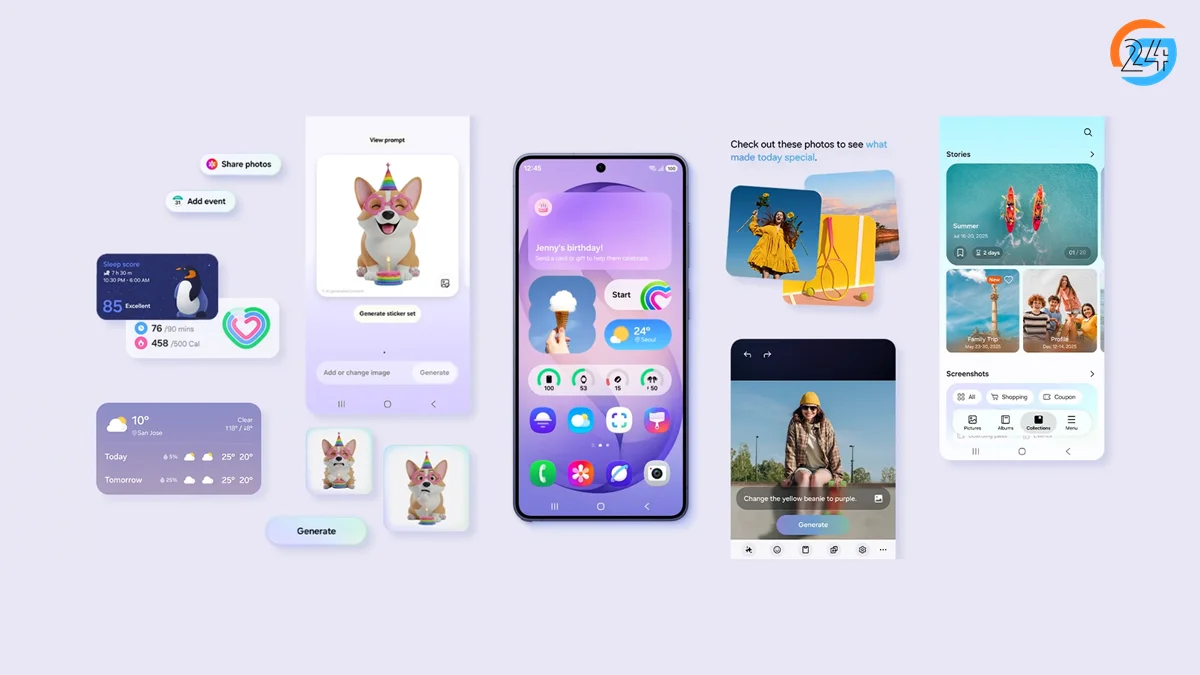
Design Changes In Samsung One UI 8.5
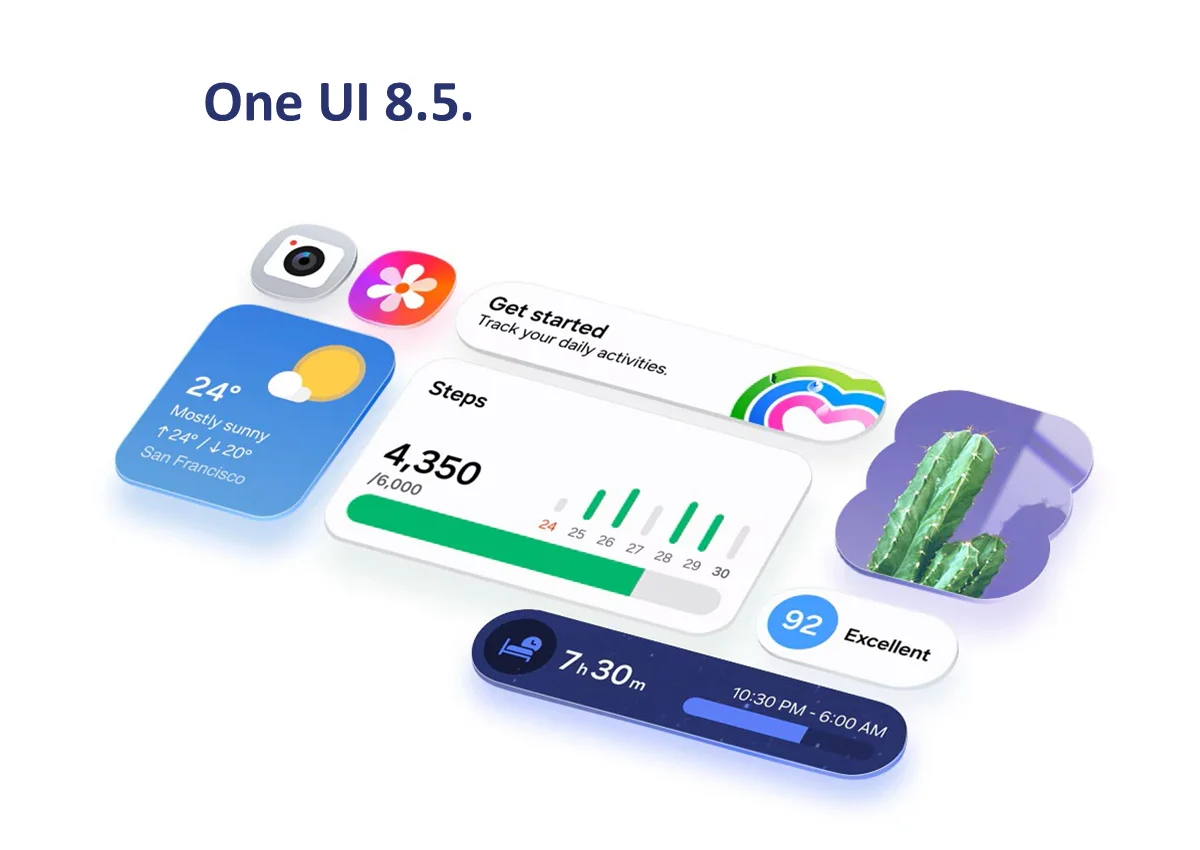
First of all, Samsung One UI 8.5 brings many design changes this time. Now, all the menus in Samsung’s native apps come in a pill shape. It looks very clean but also feels a bit like Apple iOS.
Also, many apps now have a background glow that matches the app icon color. But these changes are only in Samsung’s native apps, not all apps. We will also talk about individual apps where many changes have come.
Lock Screen Improvements In Samsung One UI 8.5
Now let’s talk about the lock screen first. And the lock screen has become smarter than before.
- So now when you apply the wallpaper, it will automatically adjust its position so that the date and time does not cover important parts of the image.
- Second, earlier in Samsung One UI 8.0 you could not move the wallpaper much. But now in Samsung One UI 8.5, even if you move, even if there is no wallpaper in that area, it will generate it so that you can adjust.
- And now you can have weather show on top of the lock screen wallpaper. So now when you are setting a wallpaper on the lock screen, there will be an option to turn on the weather switch and if it is snowing or raining then it will show on the lock screen.
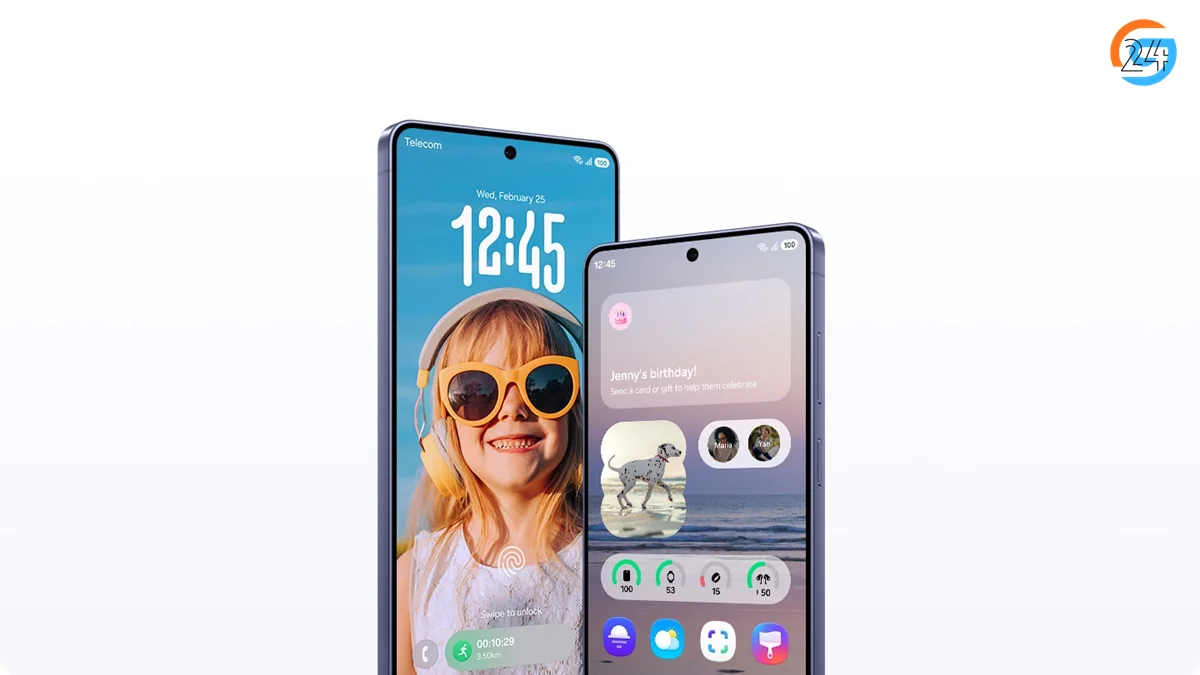
But guys, Samsung still hasn’t given depth effect wallpapers on its lock screen. In fact, if you compare it with Vivo’s Origin OS 6 or Oppo’s Color OS 16, many more options are possible in them now. But for some reason, Samsung still gives very few options for customization on its lock screen. Don’t know why and hopefully we will get it only in One 9 now.
Control Center Upgrades In Samsung One UI 8.5
There are big improvements in the control center.
- You can now resize each toggle individually
- You can place controls anywhere you want
Example:
- Keep all network controls together
- Place music controls in one area
- Or keep only basic toggles for a simple layout
New Features & Improvements In Samsung One UI 8.5
Next important change is in the control center.
Now you can customize it very well. You can control the size of each toggle and place them anywhere.
For example:
- If you use network controls more, you can keep them together
- If you listen to music a lot, you can keep music controls in one place
- Or you can remove everything and keep a simple basic control screen
Now let’s talk about some changes in how you use your phone, share files, and access system controls.
Partial Screen Recording : So guys, first of all you have the option of partial screen recording, so you can record only a specific part of the screen. Suppose you want to record only the comment section of a YouTube video or you want to record that part of the screen where even if a notification comes in between, it is not recorded, then now you can do it.
Security Feature : Next guys a safety feature has arrived. Suppose your phone is in someone’s hand, it is unlocked and he is trying to log in to some app again and again and is failing again and again. The One 8.5 will sense that something is wrong and lock your phone. This setting is called ‘Failed Authentication Lock’ by going to ‘Guys Security’, ‘Lost Device Protection’ and then ‘Theft Protection’.
Cross-Device File Access : Next guys, this is a very interesting feature that you can access the files of any other Samsung phone on your phone. So let’s say this fault is 7, I will be able to access its files in my S25 Ultra. Like this Fold 7 is mine. Now I can go to Nearby Devices on the S25 Ultra and tap on the Fold 7 to see only the Ford 7’s storage or files. And this is not just between phones, you will be able to do this with tablets or even with TVs. You just have to be on the same Wi-Fi, that is, the devices should be on the same Wi-Fi and logged in with the same Samsung account.
Samsung DeX Improvements : Next Guy Samsung has also made some improvements in Samsung DeX. First of all, now you will be able to configure multiple desktops in a single dex mode session. Secondly, in Dex mode, you will now be able to do screen recording which you could not do earlier. And thirdly if you open your apps in Samsung Dex mode, resize them and close the Dex. Your phone will remember what the window size of that app was. So the next time you open Dex and open the same app, it will open in the same size. I know there are quite a few minor changes. But it is very useful for those who use dex.
Quick Share Enhancements : Guys Next up is Quick Chair and it’s been pretty cool. First of all, guys, its design has changed a lot. Meaning, it is quite intentional and now whenever a transfer is completed, there is no dedicated screen. The second is even faster than the first. Meaning, Quick Share was faster than AirDrop. It has become more intense. And the third feature and this is very cool. I could not test this. But what happens from this? Suppose you want to quickly share a photo with a friend. He also has Samsung. In 12.5 it will detect only his face in the photo. And when you go to quick share, it will be shown as the first option automatically. It’s quite a cool thing.
Intelligent Blocking : And finally a new feature has come in Guys Settings of Intelligent Blocking. So if you have an app that sends a lot of SMS notifications. You will be able to block him now.
Native Apps Changes In Samsung One UI 8.5
Come on guys, now let’s talk about what changes have come in the individual app.
Clock App: the first one is Clock app and there is a major change in it. First of all, the design of each tab has now changed. So let me tell you everything one by one. The first one is the Alarm tab. Functionally everything is the same. But now you can choose not to see the weather of your area when the alarm goes off. One more thing. When the alarm goes off and when you hit snooze, it will start a new timer for that period of time. So now you will know how much time is left to wake up. It is a very useful thing.
World ClockApp: Next is the World Clock. Now it shows you in the background which time zone you are in, so if you are in IST then it shows you the IST region in the background. And by the way, this thing looks good in dark mode. Doesn’t look so special in light mode. Another interesting thing they have added is Time Zone Converter. Suppose I want to know what will be the time in London after 3 hours? So I can see it like this very easily. The light boxes represent that it is afternoon and the dark boxes represent evening or night. And this thing looks better in light mode.
Stop watchApp: The third one is the stop watch tab, the only major change in it is that now they have given a new design of physical stop watch. This was not there before. Well, this tab and the timer tab have been given a blue purple background glow which again was not there before. By the way, you will see the same thing in Yeh Jo Glo Hai Reminder app also. Well, if I talk about Reminder app, there is no major change. But the method of adding reminders has now come in a pill format or pill design. And how to add reminders in the UI has also changed a bit. If you compare it with Samsung One UI 8.0, you will see that the option to add reminder is very close to the keyboard and in Samsung One UI 8.5 it has been separated a bit.
Gallery App: Guys, now let’s talk about the Gallery app and it obviously makes a difference to many of us. So let me tell. Look guys, first of all again you will get this menu in pill form and if you open this photo now you will see that the design looks quite clean and a little you know not inclusive. Now if you compare 1U 8 on the left, the difference becomes a little more obvious. By the way guys, you won’t see this difference in a normal 4:3 photo. Either a 9:16 photo or if you zoom in on the photo then you will understand what is the actual difference. Also, a short types option has come in the guys menu which shows you the photos taken in different modes in an organized manner. And now if you open a specific album, neither the cover photo nor a thumbnail of that album is visible at the top. It’s quite good.
Camera App:
- Guys, now let’s talk about the Gallery app and it obviously makes a difference to many of us. So let me tell. Look guys, first of all again you will get this menu in pill form and if you open this photo now you will see that the design looks quite clean and a little you know not inclusive. Now if you compare Samsung One UI 8.5 on the left, the difference becomes a little more obvious. By the way guys, you won’t see this difference in a normal 4:3 photo. Either a 9:16 photo or if you zoom in on the photo then you will understand what is the actual difference. Also, a short types option has come in the guys menu which shows you the photos taken in different modes in an organized manner. And now if you open a specific album, neither the cover photo nor a thumbnail of that album is visible at the top. It’s quite good.
- Another useful addition is the Private Album feature. With this, you can move your personal or sensitive photos and videos into a secure space within the Gallery itself. This album can only be accessed using your biometric authentication or PIN. Earlier, similar functionality was available through Secure Folder, but this new feature is more convenient if you only want to protect media files.
- For creators who shoot log videos, the way LUTs are applied has also changed. Instead of a simple tap-to-apply option, you now need to go into the edit section and switch to standard mode to use LUTs. This change may allow support for more LUTs or even custom ones in the future.
- Talking about the Camera app, there is only a small update. In Pro mode, you now get a clean preview toggle, offering a distraction-free shooting experience.
- Lastly, the Voice Recorder app has received a major visual upgrade. The new design looks modern, with dynamic red glow effects that react to your voice and smooth waveform animations. Bookmarking during recording looks cleaner, and the recordings list now shows a redesigned play button along with duration, making the app feel more polished and user-friendly.
Voice Recorder App: But one app that I think has a major visual and aesthetic upgrade is the voice recorder app. Earlier, the old voice recorder looked simple, but now the new one looks different. When you record, the red background glow moves according to your voice.
Also, the waveform animation during recording is very well implemented and gives a nice feel. Another thing is that when you add bookmarks while recording, it looks very good. It has its own unique design and looks very beautiful.
And in the recordings list, the play button now looks different and it also shows the duration.
Samsung Internet Browser: Now, we all use Chrome only, but if you still use Samsung’s internet browser, their native browser, there are two small changes in it. First of all, the listing style of the menu has changed. The list has been formatted. Earlier it used to appear in a pop up menu like a grid. And secondly, now you can see the different websites or tabs that you have opened either in list format or in stack format or in grid format. And to change this just go here. Click on the tab. And then by clicking here you can choose among these three view styles.
Calculator App: And finally, there are minor changes in the calculator app. The first change you will instantly notice is that when you press the keys, there is a glow effect. Honestly, it was not needed and looks a bit unrealistic. In fact, if it only used shadows when we tap, it would feel more real.
The second change is that when numbers appear on the screen, they come very smoothly. It is a good change.
Which smartphones will get Samsung One UI 8.5 update?
But to the point, when is Samsung UI 8.5 launching? And when will it come to your phone? Officially guys, according to me, the end of Jain will come next year when S26 is launched. But when will it come to other phones? As always, nothing is known yet, guys. Obviously beta has already arrived in S25, so it will come soon. Ford 7 Flip 7 Basically, Samsung rolls out these phones in descending order of how expensive they were. Doesn’t push together like Apple or iPhones. So there are only so many changes in Guy Samsung One 8.5. All I can say is it’s a little chaotic. There are a lot of inconsistencies in the design right now. But see, this is the first beta so let’s not be judging right now. Let’s wait and there will be more updates and I will talk about them.
Galaxy S series
Galaxy S25, Galaxy S25+, Galaxy S25 Ultra, Galaxy S25 Edge, Galaxy S25 FE, Galaxy S24, Galaxy S24+, Galaxy S24 Ultra, Galaxy S23 FE, Galaxy S22, Galaxy S22+, Galaxy S22 Ultra, Galaxy S21 FE
Galaxy A series
Galaxy A73, Galaxy A56, Galaxy A55, Galaxy A54, Galaxy A53, Galaxy A36, Galaxy A35, Galaxy A34, Galaxy A33, Galaxy A26, Galaxy A25, Galaxy A24, Galaxy A17 (4G & 5G), Galaxy A16 (4G & 5G), Galaxy A15 (4G & 5G), Galaxy A07 (4G & 5G), Galaxy A06 (4G & 5G)
Galaxy M series
Galaxy M56, Galaxy M55, Galaxy M55s, Galaxy M54, Galaxy M53, Galaxy M36, Galaxy M35, Galaxy M34, Galaxy M33, Galaxy M17, Galaxy M16, Galaxy M15, Galaxy M07, Galaxy M06
Galaxy F series
Galaxy F70e, Galaxy F56, Galaxy F55, Galaxy F54, Galaxy F36, Galaxy F34, Galaxy F17, Galaxy F16, Galaxy F15, Galaxy F07, Galaxy F06
Galaxy Tab series
Galaxy Tab S11, Galaxy Tab S11 Ultra, Galaxy Tab S10+, Galaxy Tab S10 Ultra, Galaxy Tab S10 FE, Galaxy Tab S10 FE+, Galaxy Tab S10 Lite, Galaxy Tab S9, Galaxy Tab S9+, Galaxy Tab S9 Ultra, Galaxy Tab S9 FE, Galaxy Tab S9 FE+, Galaxy Tab S8, Galaxy Tab S8+, Galaxy Tab S8 Ultra, Galaxy Tab S6 Lite (2024), Galaxy Tab A11, Galaxy Tab A11+, Galaxy Tab A9, Galaxy Tab A9+, Galaxy Tab Active 5, Galaxy Tab Active 5 Pro
Galaxy XCover series
Galaxy XCover 7, Galaxy XCover 7 Pro, Galaxy XCover 6 Pro
How to download Samsung One UI 8.5 public beta? To download Samsung One UI 8.5 Public Beta, you will first have to register in the Samsung Members app.
- First install the Samsung Members app and log in.
- After this find the banner or card of Samsung One UI 8.5 Beta Program on the homepage.
- From here, now enroll yourself in the beta program by tapping on it.
- After enrollment, go to Settings > Software Update > Download and Install.
- Beta update can now be downloaded from here.
Note that right now the company is rolling out this update slowly so you may not get this update immediately. When we also checked this update on our Galaxy S25 Ultra, we have not received this update yet whereas some users have told that they have received this update.
When will the rollout of Samsung One UI 8.5 start?
Samsung has not yet started the roll out of Samsung One UI 8.5 update. Currently this new software is available only for Galaxy S26 series smartphones. The company will soon roll out this update for older devices.
Samsung One UI 8.5 beta update is available for Galaxy S25 series. The company has released 6 betas so far and some are left. Along with this, Samsung is also working on a beta program for Galaxy Z Fold 7 and Galaxy Z Flip 7. It is expected that the company can start the rollout of Samsung One UI 8.5 soon.